

threesheep Fitness Tracker for Men and Women,Fitness Watch Waterproof with Activity Tracker and Sleep Monitor,Smart Watch for Android and iOS Phones(Black)……
$18.99
Related Products




Product description

Warm Tips: How to Charge & Connect Bluetooth successfully
1. How to be successfully charged fitness tracker?
1)When you first get the fitness tracker watch,if you long press the rectangle touch button (on the bottom of screen) for 5 seconds and it still cannot be turned on,it means that there is out of power.Please remove the wristband on the side of the touch screen,plug into any USB power,charger for 30 minute and touch the button for 3 seconds to activate.
2)The wristband length of the slim fitness tracker watch can be adjusted from a minimum of 120mm to a maximum of 210mm. It is suitable fits most people’s wrists.
Note: Many friends said that charging failed, because it was actually plugged in backwards! Check below 3 points to confirm successfully charged.
1)Only one side with METAL PIECE can be charged 2)When we pulg in metal piece charging side together with METAL side of USB port for charging the fitness tracker correctly, the fitness tracker will vibrate once . 3) the charging icon (green) will show on screen (See below Charging Guide picture or Video on the left side of listing) if not, pls turn the fitness tracker into another face and plug again.
2. How to be successfully connect Bluetooth?
Ensure both the watch and the Runmefit App are downloaded on smartphone and updated to the latest versions. (Compatible mobile phone system: Android5.0 (inclusive) or above, IOS9.0 (inclusive) or above,Bluethoth 5.2 (not Compatible with PC,Ipad,Tablet)Make sure fitness tracker and the Bluetooth settings of the smartphone are turned on and . The Bluetooth distance of fitness tracker is 10m(32.8 feet).Activate the GPS on your phone and open all the realted authority of app (grant location permission to the Runmefit App)Open the app and check if it automatically connects. If not, it may be due to the Runmefit App not running properly in the background on your phone. For Android phones, add Runmefit App to the list of protected background applications. If there are any other activity restrictions for the Runmefit App, please address and remove them.
If you still cannot reconnect, try the following steps:
a. Restart your phone’s Bluetooth and attempt to reconnect. b. Restart the fitness tracker and attempt to reconnect. c. Restart your phone by Runmefit APP-“Devices” ,click”reconnect ” or after 5 seconds it will auto connect. d. If it doesn’t, open Runmefit APP-“Devices” -“Unbind” firstly then delete pair information, then research tracker name and re-pair the devices in the app( tracker is always turn on).Pair and Bind fitness tracker must be made in theRunmefit App, not the phone bluetooth setting.( Also it suited for the Bluetooth connection is disconnected)
If none of the above methods resolve the issue, consider resetting the watch to factory settings. Check if the paired watch still exists in the Bluetooth settings of your phone; if it does, delete the pairing information and then attempt to pair again.
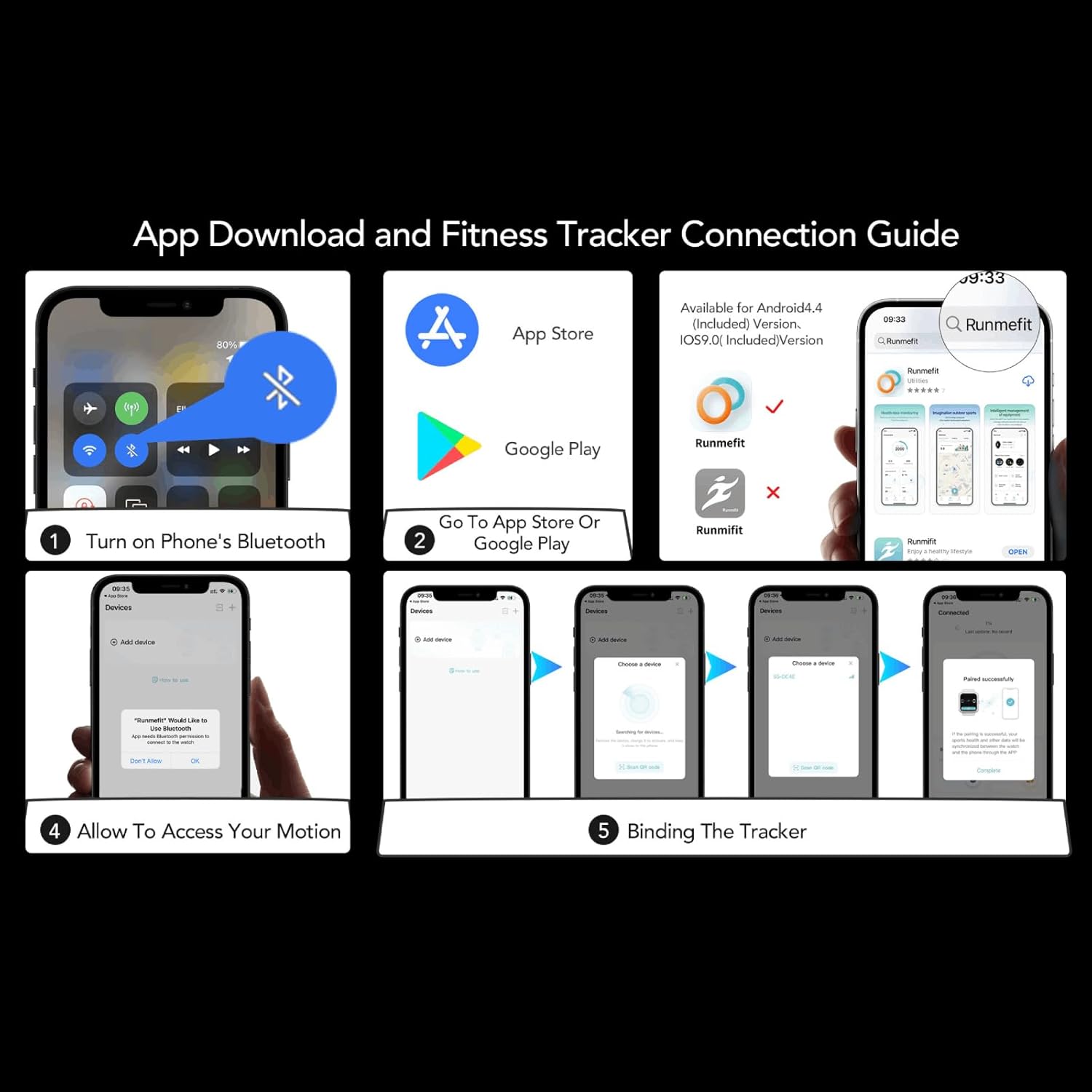
3.How to connect my fitness tracker with phone and pair in Runmefit APP? A:Turn on the bluetooth of smartphone;Go to App sotre or Google play( Remind :other 3rd party software platform may need pay money for “Runmefit”) Our Runmefit is free on App store and Google play ; Search Runmefit(Remind pls download “Runmefit” instead of “Runmifit” .There is different letter in the middle .It is“Me” not “Mi” ,like the icon as below; Meanwhile,ensure the battery is fully charged of fitness tracker and open fitness tracker ,make sure the tracker close to the phone ; Tap the “+”at the right top of App and find your device “S5”then select”pair” and waiting . It can pair successfully. (Pair must be made in the App, not the phone bluetooth setting) Noted:This activity tracker requires iOS 9.0 & Android 4.4 above, Bluetooth 5.2 (Smartphone only, not compatible with iPad, PC or Tablet) To ensure “Runmefit”APP can track your data ,pls open related authority of app in your phone and keep app working in backage even screen closed. Please read the manual for the reason why your app can’t work in the backstage.


Customize Main Interface
You can choose from the fitness tracker face market to customize main interface,or you can put your favorite photos put it into the dial.
The adjustment of wristband ,mininum is 4.7inch and maximum is 7.9 inch with 0.96inch TFT screen, weight is 0.84OZ

IP68 Waterproof
The fitness tracker with IP68 waterproof resistant, it can totally meets your daily use, such as washing hands, sweating,rain. (Note : hot showers and saunas,swimming are not recommended)

Call&Message Notification
You can view call, text, and all the other notifications including Facebook,WhatsApp, LinkedIn, Instagram, Twitter on fitness watches for women.It will let you never miss any important calls & message when you turn on message notification in Runmefit APP.

Sleep Monitoring
Wear the fitness tracker to go to bed, the sleep monitor will analyze your deep sleep , light sleep and awake time. Please note that the monitoring data only show on APP and should be for reference only and does not replace a doctor’s advice

Take Pictures Remotely
You can connect your phone and take photos through the remote control of the fitness watches for women.It’s also easy to take pictures from a distance

USB Charge
The fitness tracker design and plug it into the USB interface to charge.You can get rid of the tedious charging cable,You can charge the fitness watches for women with either:( see charging guide picture)
1.Any phone or table USB Power Adapter
2.USB port on PC(Note:Charge the fitness tracker on PC USB port may take longer time)
3.Wall charger or power strip with USB port

FAQ:
Q1.Why the fitness tracker could not be turn on?
When you first get the fitness watches for women,if you long press the rectangle touch button for 5 seconds and it still cannot be turned on,it means that there is out of power.Please remove the wrisband on the side of the touch screen,plug into any USB power,charger for 30 minute,or touch the button for 3 seconds to activate.
Q2.Why the fitness tracker could not be charged? Only one side with METAL PIECE can be charged . When we pulg in metal charging piecer together with METAL side of USB port for charging the fitness tracker correctly, the fitness tracker will vibrate once and the charging icon (green) will show on screen (See below Charging Guide picture or video on left side of listing)
Q3.How to set the fitness tracker watch date and time?
1.Please connect the fitness tracker watch with your Phone by downloading Runmefit APP firstly. 2.The fitness tracker watch will automatically synchronize the time and date your phone after binding. 3.When the tracker is out of power,there may be an error in the tracker time.After the battery is fully charged,please connect your phone and,it will automatically synchronize the time to your tracker.If not, Swipe your finger down the top to update the “home” of Runmefit APP.
Q4.Why the call notification was turn on,the tracker does not vibrate when my phone receives the call?
Please confirm the Bluetooth of phone is turned on and linked with the tracker,then check if the Runmefit APP is working(click “Devices”–> “S5” is Connected , “Notification”->”Turn on all notifications”) If you dont’ want to receive message notification,turn it off and click[Devices]- [Do not disturb mode]-open Do not disturb all day or at regular intevals.
Q5.Is the step count data inaccrate?
-1)Input your Personal informations such as gender, birthday, height, and body weight and GPS positioning functionality to enhance the accuracy of data tracking across various sports activities,like pedometer for walking steps and miles. -2)Open Runmefit APP,click”Devices”–>”Device settings”–>turn on”Automatic measurement” -3)Ensure precise data accuracy by wearing the watch close to your skin, with the strap positioned one finger away from your wrist. -4)The wristband utilizes a three-axis accelerometer with a standard deviation of approximately 2%, which is considered normal. Keep in mind that most fitness trackers count steps through hand movement during walking, and there may be a slight delay in updating step count data. If you walk fewer than 20 steps within a timeframe, the step tracker may not count to minimize inaccuracies during periods of inactivity such as working or sleeping. -5) Swipe your finger down the top to update the “home” of Runmefit APP to sync the datas
Q6.Why can’t I connect Bluetooth? The Bluetooth distance of fitness tracker is 10m(32.8 feet). If the Bluetooth connection is disconnected, Restart your phone by Runmefit APP-“Devices” ,after 5 seconds it will auto connect. If not, pls unbind the device in the app firstly and rebind it to restore the connection (no data usage will be affected. )If it still can’t work, delete “S5 ”pair information ,tap” +”search again and bind it .
Q7.Unit settings (Celsius or Fahrenheit, imperial or metric): Open the APP, click [My], and click system settings to to customize the units. Alarm clock only can set in APP and sync to fitness tracker.
Q8.The screen is stuck? Upgrading the APP to latest version . If the screen of your fitness tracker is stuck, pls click “Restore Factory Setting” on “Runmefit”APP and plug it into the USB port for charging then restore the screen and it become normal .
Q9.Where can I see the record of heart rate etc? See all the record in Runmefit APP. Please click [Device settings] and turn on automatic measurement . See whether [Device]in APP is connected with “S5”. Swipe your finger down the top to update the “home” of Runmefit APP to sync the datas. Sleep dataONLY can see on APP(measured from 21:00pm to 9:00am).
Q10.How to touch the screen of all sports mode and “more”-power off, factory reset for fitness tracker ? Long press the button for 3 seconds for enter and exit .
More questions, pls see check the operation guide of “Questions and help ” of APP or click on the order and click [Contact Seller] to reach out us.We are consistently available online to assist you.


【24-hour Activity Tracking&16 Professional Sports Modes】- The threesheep fitness tracker watch accurately records all-day activities like step tracker, carlorie tracker,step counter for walking, distance etc.There are coverage of indoor and outdoor 16 professional sports modes built into the fitness tracker to help you achieve your fitness goals
【Real-time Health RateMonotoring&Women’s Health】- The fitness tracker for women and men monitor your heart rate,blood pressure and blood oxygen,which help you know body condition. The health tracker with sleep tracker for men and women as well.sleep datas only can see in App. Download “Runmefit” APP in smartphone then pair with fitness tracker, the period record will be show on App.(Note:The blood pressure and blood oxygen values monitored by this watch are for reference only and cannot be used for medical purposes)
【Call&Message Intelligent Notification】- You can view call, text, and all the other notifications including Facebook,WhatsApp, LinkedIn, Instagram, Twitter on fitness tracker.When you turn on phone’s bluetooth, if you receive a message ,the watch will vibrate and get your note on fitness tracker . Nerver miss any important calls & message.Fitness trackers for women compatible andorid ,iphone mobile phone system: Android5.0 (inclusive) or above, IOS9.0 (inclusive) or above(not Compatible with PC,ipad,tablet)
【Take Pictures Remotely】- You can control your smartphone to take photos by using your fitness tracker watch anytime,anywhere.Which explore the new fun of taking photos without a selfie stick and show your every wonderful moment
【Fantastic Gift for Your Family and Friends 】- Threesheep fitness tracker watch for women and men is fantastic gift for your loved one. Noted Get fitness tracker band off to charge at 45-degree angle,as shown in the charging method picture . Pulling it straight up or at the wrong angle may cause the band to break or deteriorate.
【Build-in USB Charger&Long Working time】- The fitness tracker has not extra charging cable .It is built-in USB plug, which can be charged directly on any computer and USB charger; no adapter and charging cable required. It takes only 2 hours to charge and can be worked for 5-7 days (Noted: Both sides can be removed,but just one side with metal piece can be charged. pls plug the metal piece with charging icon into any USB port . Also,If the green charging icon isn’t show on screen,turn watch to another face and plug -see below guidance picture)
【Charging&Pairing Method】-You can learn more about how to charge ,how to pair with run me fit watch from below attached “troubleshooting guide” or video on the top left side or quick guide in packing.If you have any questions, pls feel free to click on the order and click [Contact Seller] to reach out to us anytime
5 reviews for threesheep Fitness Tracker for Men and Women,Fitness Watch Waterproof with Activity Tracker and Sleep Monitor,Smart Watch for Android and iOS Phones(Black)……
Add a review

$18.99
Eddie Risbergs –
A great lightweight Fitness tracker that is surprisingly accurate. Also has blood sugar tracking
This is a really good and accurate little Fitness tracker. It uses the Runmefit app which is pretty much everything you need for this. The watch itself is configured from the app only so you will definitely need it to make it work and set your goals Etc. As far as accuracy goes this thing is pretty good it’ll even read properly while walking on a treadmill. And the Sleep monitoring is pretty good. All in all such a small watch surprised me. When you put it on your arm you’ll hardly notice it’s there. It’s very thin and light and conforms nicely. The only con I can think of in the whole thing is that the app has begun integrating AI which is all over your home page and only talks about sleep monitoring. They need to put a little X on that card so you can turn it off because beyond that it really is annoyingly in the way of the main screen. Not a deal breaker and hopefully they’ll correct that soon
Barbara Campagna –
Absolutely useless!
I had this just over a month when we had a time change. When the time changed my watch stopped syncing with my cell phone and does not respond to anything. I have tried every step in the little booklet that came with it. I have everything that it tells you to do in the app and anything I could find online. I have also written to the address in the little flyer that came with it and have gotten no response. This is completely useless to me. It is 4 1/2 hours off and will not sync in any respect. I had one the cost about the same price or a little less for probably four or five years and it worked fine. This one is nothing but a piece of junk and I can’t get anybody to talk to me or know where I can return it . So, do not buy this tracker. Spend a little more money and get one that will work.Additionally, I called and talked to an Amazon customer service representative, and they will do nothing for me… Nothing at all… Because the item worked for 35 days and did not stop working within the 30 day return period. They could not even furnish me with the manufacturer information, which incidentally is not on the package. There is only an email address from which I received no response. One would think that Amazon would not handle such junk items.UPDATE: writing the above review I received an email or text. Can’t remember which from the manufacture. They told me that they were refunding my money, which they did to my AMEX account. I felt they deserved my reporting this for what it is worth to anyone who wishes to buy or has bought this product.
Kristy A –
Perfect, simple & efficient
I bought 2 other smartwatches that were way too complicated. This one is perfect! I love the watch face selections and the simple but sufficient options. The message & call notification is great when you can’t always hear your phone. It’s small and fashionable with comfort and meets all my needs.
Wendy Horne –
It’s not as good as the original
I have had one of these for a few years. The band and connector broke, so we had to part ways. This one has been changed from the original. I prefer the original. The blood pressure has been taken out and blood oxygen is in place of it. Also where the steps are shown also has calories and miles. I preferred just the steps, because it was easier to read instead of all that in one section. Luckily it survived considering it was sent in the same box as kitty litter and the kitty litter was directly on top of it🙄Guess that shows it’s sturdy LOL
Giuoco Piano –
Android app follies
I bought this watch because I wanted to explore a fitness watch at a low entry point until I can decide if I want a more capable and more expensive watch. This particular watch requires the use of the Runmefit app to get the most out of it. This includes more complex activities such as recording and displaying sleep data during the night, but also simpler tasks such as setting the watch to display temperature in Fahrenheit and to select the watch face appearance, so the app both receives and transmits to the watch.I had a lot of problems with the app I downloaded for my Android phone. It (not me!) disconnected Runmefit from bluetooth and when I tried to reconnect to bluetooth I kept getting the message that it needed app location permissions turned on … which they were! It at least showed that it still recognized the watch as a “device.” Until I tried to remove it as a device and then reconnect it, thinking maybe that was necessary to get around the bluetooth problem. When I tried that, the app wouldn’t recognize the watch (“device”) at all.So I downloaded Runmefit to my iPad, to see if it would run better there. It immediately connected with no issues. Thank you “Walled Garden”!One other thing to know that you don’t find out until you stumble across the S5 Operation Manual several layers deep into the app, is that the way to move through the various functions on the watch is to tap the little rectangle on the bottom of the face. Also, when the Android app no longer recognized the device (let alone establish bluetooth connection) it would no longer show me the Operation Manual, probably needing to know what kind of device to know what kind of manual … I guess. That makes sense if the app is written for more than one kind of device. Probably works the same on my iPad, but you can bet I’m not going to remove the device from the app just to find out.I have no measurement comparison (other than my thermometer for temperature) for some of the various medical data (heart rate, blood pressure, blood oxygen) but I’m hoping to collect that data on my next doctor visit for comparison. The documentation says that data is “for reference only and cannot be used on a medical basis” which I interpret to mean there are no guarantees or even tolerances (e.g., +/- 20%) for those results. Maybe those are in a specification sheet … somewhere. But that’s okay, as long as the results are reasonably consistent I can record my numbers on a daily or weekly basis or whenever I think of it, and compare the results myself to see if anything is changing in a sinister fashion.The Sleep measurement shows that I slept 8 hours 40 minutes last night. My cpap machine says I slept 8 hours and 45 minutes. That’s amazing, the watch is getting that (and the heart info) from sensors on the back of the watch. The watch shows me the instantaneous values of things like blood pressure and then the app can display a graph showing how they changed during the month. I’m guessing my blood pressure spiked when I was trying to get the Android app to work.I’m not reporting on the various exercise functions, I haven’t tried them out. The watch does tell me how many steps I’ve taken and how many calories I’ve burned during the day with no setup required from me.And maybe the Android app is just fine, maybe I just bungled the initial setup and couldn’t dig my way out, silly me 🙁 . I’m reporting my misadventures to help out anyone with similar difficulties.*** edited 5-13-23 *** I visited my dentist and after the hygienist measured my heart rate and my blood pressure I compared the measurements she took with those of the watch. Very nearly identical. However, blood pressure measurements seem particularly iffy. Just now I took six consecutive measurements and measured 111/73, 121/83, 126/80, 114/64, 114/64, 108/70.*** edited 6-13-23 *** First watch I’ve ever owned that I can’t read outside in the daylight. Frequently the app will disconnect from Bluetooth, and it is a simple matter to reconnect it in ‘Devices.’ The clue is that you can’t read any chart data on the app because it can’t connect to the watch without Bluetooth. And the app won’t show the display face options if it is not connected to Bluetooth.*** edited 11-2-23 *** Some temperature data I collected when I wasn’t feeling well, a bigger variation than I was hoping for.Oral thermometer: 99.6Infra-red forehead: 98.6Watch: 97.8Consecutive morning battery voltage levels (as reported by the watch) from a full charge: 100%, 97, 78, 54, 45, 34 and then it quit later that day; so I got almost 5 1/2 days on a charge.*** edited 2-2-24 ***. The watch strap broke! The strap comes in two pieces, one attaches to the top of the face and one attaches to the bottom of the face. The bottom strap is the one you remove to recharge the face piece. The top strap has the buckle and is the one I never remove. Until now.This might be my fault if I was grabbing onto the top strap as leverage when I removed the bottom strap for charging. If I was doing that, I might have broken the glue bond to the top strap. In the future I will be sure and only hold the watch face and not the top strap when I am trying to attach or remove the bottom strap. I glued the top strap back to the top of the watch face with a super glue. It seems to be holding fine.*** edited 8-4-24 *** . My watch would no longer link to the app. I switched to a new, unused watch that I bought recently and it connected fine. I had to update the app and also the watch firmware.*** edited 8-31-24 *** I’m getting shorter charge duration with the new watch. From a full charge: 100%, 78, 48, 21 and then it quite early in the last day. I got just over 3 days of use on the charge.*** edited 12-9-24 *** Select the watch display and the ‘How to use’ options such as ‘Device connection’ and ‘S5 User Manual’ work again. Yay!*** Edited 7-13-25 ***. My second watch broke on the strap again, only this time I couldn’t get it to glue back. I bought a third watch and it has much improved design for the strap: the buckle strap press fits on to the watch in a similar manner as the bottom strap, so no glue to break. The built in instructions are poor or nonexistent again, these things seem to come and go with newer versions of the app. It appears to no longer perform a blood pressure test. I had problems with menu tap at first, it seems okay now. For a few days the watch face rectangle wouldn’t respond to taps until I started double-tapping it to get it started.